Migration to new web hosting almost complete. One step need to take at the moment is :

Announce new url while maintaining traffic

The solution is simple, just enable permanent redirection 301.

Step by step guide on activate permanent redirection 301 with cpanel hosting.

Cpanel login

Make sure to open port 2082

Cpanel Domains Menu

Click Redirects icon as shown in the picture.
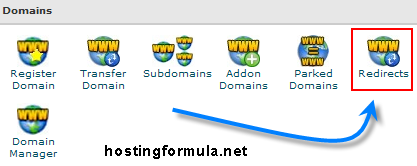
permanent redirect 301 3 Step by step setting permanent redirect 301 with cpanel

Redirection menu

  1. Choose Permanent (301) from type.
  2. Choose old domain that will redirect
  3. Enter new address in redirects to input box.

Check Wild Card Redirect.

Click Add
Continue reading »


Sorry for late post, I have to attend a meeting for three days. Held by my office. Yesterday I get rest and today I’m ready to write. I hope you don’t mind icon smile Step by step move drupal from localhost to drupal hosting : From Localhost to Online

Before we continue I just want remind you steps that we have done as follows :

  1. Setting Domain : cover step by step guide pointing domain to hosting company.
  2. Setting Add On Domain : how to set add on domain in cpanel.

Lets continue the rest.

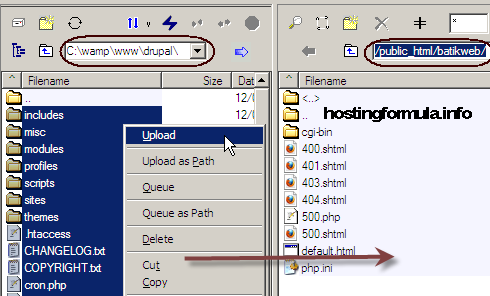
Upload Drupal

Get ftp client like coreftp, filezilla and upload your drupal files to your hosting account.

drupal hosting Step by step move drupal from localhost to drupal hosting : From Localhost to Online

Wait for while, get tea, coffee or soft drink until process finish.

Continue reading »


At previous post I have covered steps for domain setting. Make sure the domain already pointed to drupal hosting account. In this case I use Fastdomain.  In this post I’ll try to explain the steps taken in hosting side.

Addon Domain Setting

Login to your cpanel and click on”Addon Domains

move drupal set addon domain 1 Step by step move drupal from localhost to drupal hosting : AddOn Domain Setting

Assign Domain

There is 4 steps in FastDomain Assign Domain :

1. Enter Domain.

Since batikweb.com domain is new in the system I pick second option.

Continue reading »

© 2011 Hosting Formula Suffusion theme by Sayontan Sinha