My friend who start to learn Amazon affiliate ask me whether I can check which version of these link that work :

http://www.amazon.com/gp/product/1430231149/tag=xxxx-20

or

http://www.amazon.com/gp/product/1430231149?tag=xxxx-20

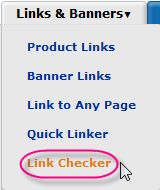
I don’t know the answer since there are many variation of of Amazon link but I do want to know too. After checking affiliate panel I know that I miss one important link that Amazon provide from long time ago.

Link Checker

amazon checker link Checking for Valid Amazon Link

Just enter those 2 links and hit “Check Link” button.

For 1st link I got this message :

Fail: The link above was not tagged or was not a valid Amazon link.

For 2nd link I got this message :

Success: The link tags to a valid tag or sub-tag for your Associate ID.

p.s : I change xxxx to valid associate tag.

Very useful link as many will lost their referral fees when use it incorrectly icon smile Checking for Valid Amazon Link


Make a good article it is not easy, there are several components that you should have and could have collected to produce an article ready to publish.

The idea is, if you have a blog or web with a particular niche then you need an idea that many and varied and should be a topic of your niche.

Packing posts, how to draw on the title, introduction, body and conclusion ideas can easily be read.

To facilitate you in making a good article then have available a web-based facility that is named Jiffy Articles.

At this time account Jiffy Articles can be obtained for free, you will be guided in making the article with great ease. Please see the following images:

ja1 How to write unique content FAST with Jiffy Articles

Continue reading »

Dreamhost MySQL

 Info  Comments Off
Oct 272011
 

Being cpanel user make me a bit lazy when I have to do mysql export job as part of wordpress transfer process but I enjoy it icon smile Dreamhost MySQL

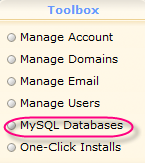
Dreamhost is provide access to their service via toolbox, as you see from the picture there are 6 shortcut :

  1. manage account
  2. manage domains
  3. manage email
  4. manage users
  5. mysql databases
  6. one click installs
one click installs work like simple script or fantastico if your are using cpanel, easy to use but if you don’t know those component glued (mysql database, domain pointing and file manager) you’ll bit confuse for a while icon smile Dreamhost MySQL
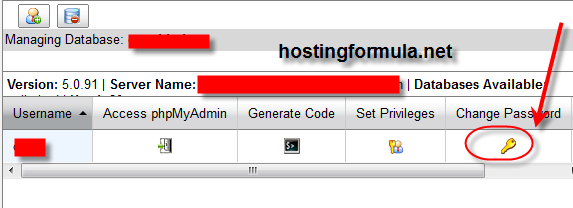
In the case where I want to backup mysql database I open ftp client and download wp-config.php to see username and password plus database name for backup purpose.
After I have all information I click “MySQL Databases” from Toolbox section.

dreamhost mysql 1 Dreamhost MySQL

Continue reading »

© 2011 Hosting Formula Suffusion theme by Sayontan Sinha