Downgrade php version on Wampserver

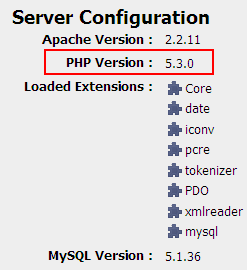
Big change from PHP 5.2.xxx to PHP 5.3.xxx in latest wampserver version (2.0i) resulting some problem in existing project :

Related to ereg() function.

downgrade php wamp 1 Downgrade php version on Wampserver

Whenever you face the problem you can choose :

  1. Change ereg() to mb_ereg()
  2. Downgrade your PHP version.

Fortunately  wampserver support addon.

At the moment addon that wampserver support are :

  1. Choose your MySQL version.
  2. Choose your PHP version
  3. Choose your Apache version.

Downgrade PHP

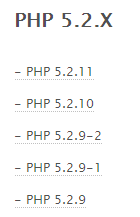
Simply download any version from PHP family :
downgrade php wamp 2 Downgrade php version on Wampserver

I choose PHP 5.2.11

Double click the setup file and continue installation till finish.

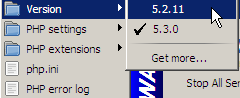
Start Wampserver and click on the tray

downgrade php wamp 3 Downgrade php version on Wampserver

Choose PHP 5.2.11

downgrade php wamp 4 Downgrade php version on Wampserver

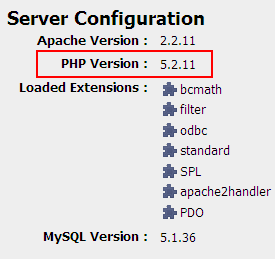
Wait for moment and refresh localhost to see new activated PHP version.
downgrade php wamp 5 Downgrade php version on Wampserver

Yes, when you see same as I see then you’re done.

Happy PHP-ing.

Kudos to Wampserver creator!

Related Reading:

Using DrupalUsing Drupal

With the recipes in this book, you can take full advantage of the vast collection of community-contributed modules that make the Drupal web framewo... Read More >

Drupal For DummiesDrupal For Dummies

Learn to set up, manage, and administer a Drupal Web site

Drupal offers unparalleled flexibility for content-managed Web sites, but most ... Read More >

Pro Drupal Development, Second EditionPro Drupal Development, Second Edition

Widely praised for its in–depth coverage of Drupal internals, bestselling Pro Drupal Development has been completely updated for Drupal 6 in thi... Read More >

Front End Drupal: Designing, Theming, ScriptingFront End Drupal: Designing, Theming, Scripting

“For Drupal to succeed, we need books like this.”

–Dries Buytaert, Drupal founder and project... Read More >

Cracking Drupal: A Drop in the BucketCracking Drupal: A Drop in the BucketThe first book to reveal the vulnerabilities and security issues that exist in the sites that have been built with Drupal?and how to prevent them from... Read More >

Thanks for reading, if you think this post help you please consider to buy me a beer

Search Terms :

  • downgrading php version
  • wamp downgrade php
  • downgrade php wamp
  • WampServer php 5 2
  • addon for wampserver
  • wamp downgrade
  • drupal switch apache version
  • wamp server php 5 2
  • downgrade php in wamp
  • cache:ARZPnr5Rw6oJ:www hostingformula net/wordpress-error-the-uploaded-file-could-not-be-moved-to/ wp The uploaded file could not be moved to
  • how to downgrade php wamp
  • how to downgrade php version
  • downgrade wamp
  • downgrade php version wamp
  • wamp php versions
  • wamp addon install
  • wamp downgrading php
  • php addons wampserver
  • php Addons version 5 2 wampserver 2
  • php 5 2 11 on wampserver 2 0
    • Share/Bookmark
    Tips

    If you enjoyed this post, please consider to leave a comment or subscribe to the feed and get future articles delivered to your feed reader.

    Leave Comment

    (required)

    (required)