Install WordPress 2.7 Beta 2
It seem I myself can’t wait to see how wordpress 2.7 looks like
After pick my wife I continue to install it, since I have my words for continue the tutorial I do it slowly.
Next steps after extract wordpress 2.7 file :
Create database
1. Go to phpmyadmin panel
Click on MySQL Database Wizard

2. Fill database name and click ‘Next Step‘
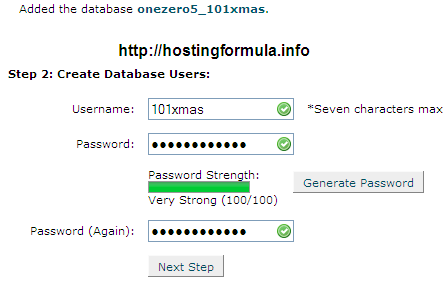
3. Fill username and use ‘Generate Password‘ button to create password.
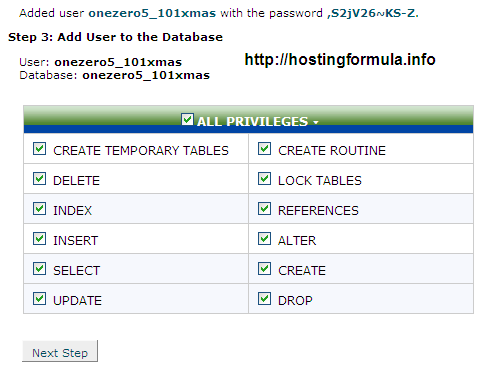
4. Click ‘Next Step‘ after tick on ‘ALL PRIVILEGES‘
Install WordPress 2.7 Beta 2
5. Open web browser and fill every information or edit wp-config.php manually
After installation process I login to admin panel.
Oh my GOD, the interface is fantastic:-)
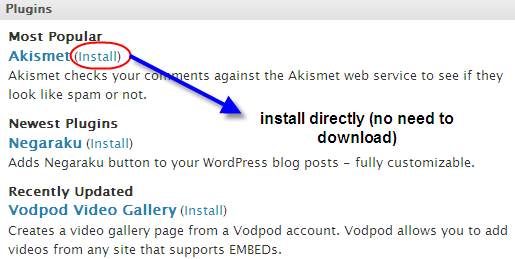
I try to install all in one SEO plugin directly from admin panel.
Done.
All process went smooth in hostmonster.
Will contact my client for username and password of this blog.
I’m sure he’ll scream to see wordpress 2.7 interface
Related Reading:
Using DrupalWith the recipes in this book, you can take full advantage of the vast collection of community-contributed modules that make the Drupal web framewo... Read More >
Drupal For DummiesLearn to set up, manage, and administer a Drupal Web site
Drupal offers unparalleled flexibility for content-managed Web sites, but most ... Read More >
Pro Drupal Development, Second EditionWidely praised for its in–depth coverage of Drupal internals, bestselling Pro Drupal Development has been completely updated for Drupal 6 in thi... Read More >
Front End Drupal: Designing, Theming, Scripting“For Drupal to succeed, we need books like this.”
–Dries Buytaert, Drupal founder and project... Read More >
Cracking Drupal: A Drop in the BucketThe first book to reveal the vulnerabilities and security issues that exist in the sites that have been built with Drupal?and how to prevent them from... Read More >
If you enjoyed this post, please consider to leave a comment or subscribe to the feed and get future articles delivered to your feed reader.


