
A few email enter my mailbox regard my last post about setting mysql root password in wampserver.
The exact message is :
Welcome to phpMyAdmin
Error
MySQL said: Documentation
Cannot connect: invalid settings.
phpMyAdmin tried to connect to the MySQL server, and the server rejected the connection. You should check the host, username and password in your configuration and make sure that they correspond to the information given by the administrator of the MySQL server.
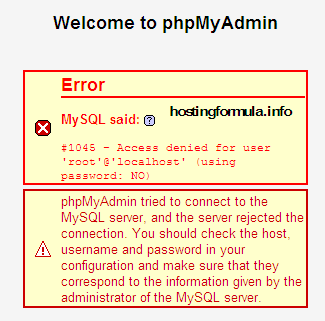
You already install Wampserver (any version) and I try to explain how to fix this problem.
By default wampserver will install in folder C and I’ll use that information as base of tutorial.
Open Configuration file of phpmyadmin
Go to folder :
C:\wamp\apps
you’ll see folder ‘phpmyadmin3.2.0.1‘ , value of 3.2.0.1 will be vary depend on your wampserver version.
double click that folder and find file with name “config.inc.php”
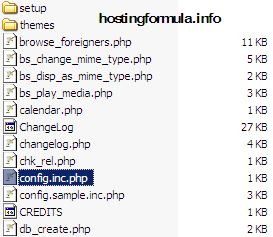
Change the file
Double click ‘config.inc.php’.
Original content of the file is :
[sourcecode language=”php”]
/* Servers configuration */
$i = 0;
/* Server: localhost [1] */
$i++;
$cfg[‘Servers’][$i][‘verbose’] = ‘localhost’;
$cfg[‘Servers’][$i][‘host’] = ‘localhost’;
$cfg[‘Servers’][$i][‘port’] = ”;
$cfg[‘Servers’][$i][‘socket’] = ”;
$cfg[‘Servers’][$i][‘connect_type’] = ‘tcp’;
$cfg[‘Servers’][$i][‘extension’] = ‘mysqli’;
$cfg[‘Servers’][$i][‘auth_type’] = ‘config’;
$cfg[‘Servers’][$i][‘user’] = ‘root’;
$cfg[‘Servers’][$i][‘password’] = ”;
$cfg[‘Servers’][$i][‘AllowNoPassword’] = true;
/* End of servers configuration */
$cfg[‘DefaultLang’] = ‘en-utf-8’;
$cfg[‘ServerDefault’] = 1;
$cfg[‘UploadDir’] = ”;
$cfg[‘SaveDir’] = ”;
?>
[/sourcecode]
Change $cfg[‘Servers’][$i][‘password’] = ”; to new value
$cfg[‘Servers’][$i][‘password’] = ‘yourmysqlrootpassword’;
save the file and try access phpmyadmin.

I hope it help 🙂
Stay Health!