
In previous post I have talk about fix ereg() problem that show up when I use wampserver that utlize php 5.3.0.
I’ll continue with vhost feature in Wampserver that asked by a reader via contact form. I try to explain that thing first.
VirtualHost is a special feature in apache that allow us to host multiple domain in single IP address.
I’ve set 2 domain in the past :
those url use same IP which is : 127.0.0.1
First URL (winhows.net) don’t add a entry in httpd.conf or httpd-vhost.conf but second URL (batikweb.com) available after add entry in httpd-vhost.conf .
<VirtualHost *:80>
ServerAdmin [email protected]
DocumentRoot “C:/wamp/www/drupal”
ServerName batikweb.com<Directory “C:/wamp/www/drupal/”>
Options Indexes FollowSymLinks MultiViews
AllowOverride all
Order Deny,Allow
Deny from all
Allow from 127.0.0.1</Directory>
</VirtualHost>
How about clean url feature in drupal ?
Let me continue drupal installation first as I’ll show it in step by step.
Continue Install Drupal
-> Choose Language
Click Install Drupal in English
I have this error :
Requirements problem
The following error must be resolved before you can continue the installation process:
The Drupal installer requires that you create a settings file as part of the installation process.
- Copy the ./sites/default/default.settings.php file to ./sites/default/settings.php.
- Change file permissions so that it is writable by the web server. If you are unsure how to grant file permissions, please consult the on-line handbook.
More details about installing Drupal are available in INSTALL.txt.
Please check the error messages and try again.
Solution :
Go to folder : C:\wamp\www\drupal\sites\default
change file with name : default.settings.php to settings.php .
Open settings.php and edit the entry, specially these lines :
$db_url = ‘mysql://root:typenewpasswordhere@localhost/drupal’;
$db_prefix = ”;
$base_url = ‘http://batikweb.com’; // NO trailing slash!
-> Setup database
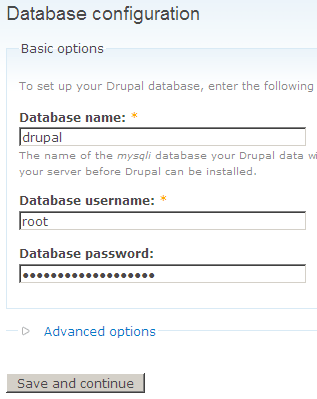
Fill every information correctly and click ‘Save and continue‘
I got this error message :
The following error must be resolved before you can continue the installation process:
Failed to select your database on your MySQL database server, which means the connection username and password are valid, but there is a problem accessing your data. MySQL reports the following message: Unknown database ‘drupal’.
- Are you sure you have the correct database name?
- Are you sure the database exists?
- Are you sure the username has permission to access the database?
For more help, see the Installation and upgrading handbook. If you are unsure what these terms mean you should probably contact your hosting provider.
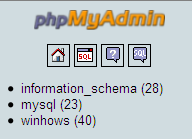
It seem that database ‘drupal‘ don’t exist, I must create it first.
go to right side of phpmyadmin and create database ‘drupal‘.
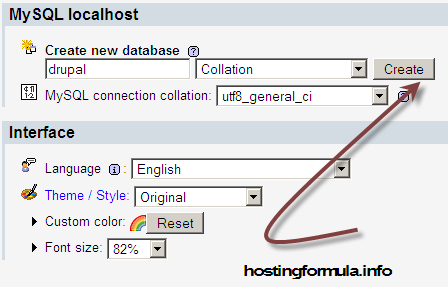
After create database ‘drupal‘ retry drupal installation process.
This time it work and I got this screen :
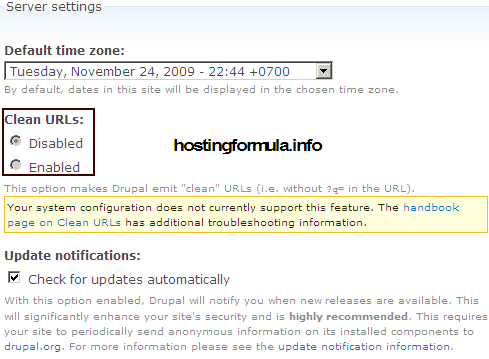
Your system configuration does not currently support this feature.
Solution :

uncoment line 116 into this form :
LoadModule rewrite_module modules/mod_rewrite.so
save file and restart wampserver.
Refresh the page and you should see this
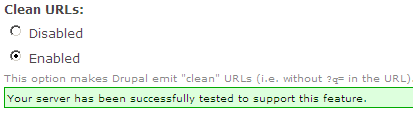
Save and continue.
you should see this message :
Drupal installation complete
Congratulations, Drupal has been successfully installed.
You may now visit your new site.
Great.
I enter email address that I set in previous install ( install mailserver on localhost) and I got this message in my mailbox :
batikweb,
Your account at batikweb.com has been activated.
You may now log in by clicking on this link or copying and pasting it in your
browser:http://batikweb.com/?q=user/reset/1/1259079134/759feb1dd7ce8e0c5fafcca4251c0ad6
This is a one-time login, so it can be used only once.
After logging in, you will be redirected to
http://batikweb.com/?q=user/1/edit so you can change your password.Once you have set your own password, you will be able to log in to
http://batikweb.com/?q=user in the future using:username: batikweb
Install process goes smooth.
See you in other article, stay health!
Thanks, this helped 🙂
Although you should provide the name of the file where
“LoadModule rewrite_module modules/mod_rewrite.so” needs to be edited (which I found by googling – httpd.conf in the apache folder).