
At previous post I have covered steps for domain setting. Make sure the domain already pointed to drupal hosting account. In this case I use Fastdomain. In this post I’ll try to explain the steps taken in hosting side.
Addon Domain Setting
Login to your cpanel and click on”Addon Domains”

Assign Domain
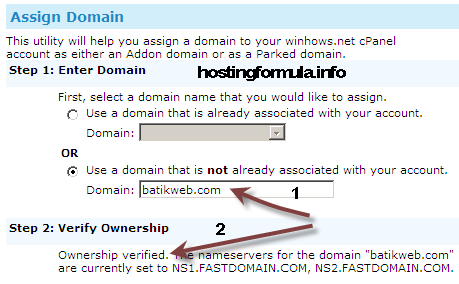
There is 4 steps in FastDomain Assign Domain :
1. Enter Domain.
Since batikweb.com domain is new in the system I pick second option.
Choose “Use a domain that is not already associated with your account” and enter batikweb.com
Right click anywhere to make their system automatically find out where the domain DNS.
2. Verify Ownership
FastDomain system will automatically process and display the result. As you see the ownership verified successfully to
NS1.FASTDOMAIN.COM and NS2.FASTDOMAIN.COM
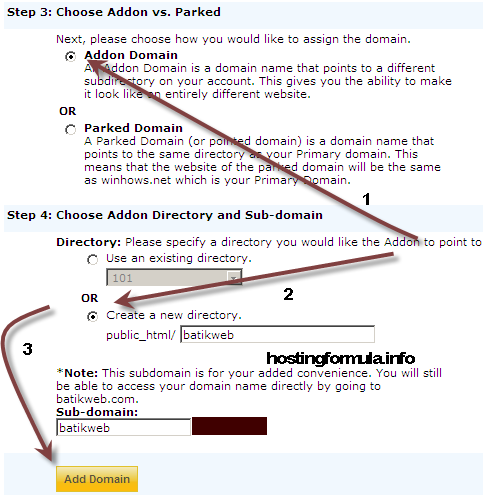
3. Addon Domain
As shown in the picture.
An Addon Domain is a domain name that points to a different subdirectory on your account. This gives you the ability to make it look like an entirely different website.
Click radio button near “Addon Domain“.
4. Choose Addon Directory and Sub-domain.
Choose “Create a new directory” radio button followed by click button “Add Domain”.
Wait for a while and you’ll see “Success” message.It means you can go on for next step.
Click on Cpanel link to go to main page.
Setting Database
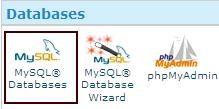
Go to Database section and click “MySQL Databases”
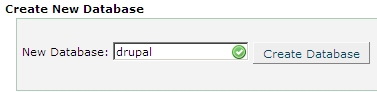
Go to Create New Database and enter name of database that you want to make.
I enter ‘drupal’ and click “Create Database”
Click Go Back and go to “MySQL Users” section.
Enter username and pick password using generate password button.
Make sure to write down the password to temporary place like notepad, gedit etc.
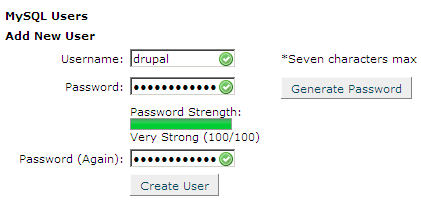
Click Create User.
Success message will display like this :
Added user drupal with the password YqpN1}+!&)m@
Click Go Back and go to “Add User To Database”
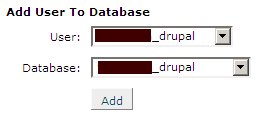
The redbox I hide is prefix provided by FastDomain. Click Add button to continue.
In Manage User Privileges section just click “ALL PRIVILEGES” to automatically check all options.
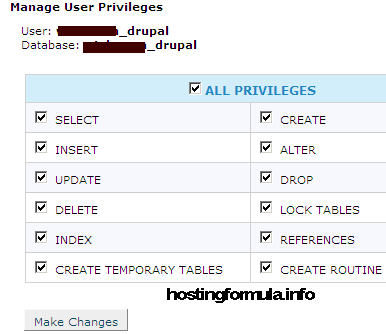
Click Make Changes button.
Confirmation message will show up like this :
User xxxx_drupal was added to the database xxxx_drupal.
Summary
In this post I’ve highlight process taken in drupal hosting side. First process is setting addon domain followed by all steps taken for setting database. Make sure to write this information :
- MySQL username
- MySQL password
- MySQL database
As we we’ll need that information for next post in this series.
See you in next post.
Stay Health!