Step by step install Expression Engine with WampServer

I’ve ever use pmachine long time ago and I like it very much. Today pmachine replaced by expression engine as they offer more dynamic feature but still in simple user GUI for end user.

This time I’ll show how to install expression engine in localhost with help of Wampserver.

Fake Domain I’ll use is : dariawal.com

Friendly URL for search engine needed too.

Enough, I’ll continue the tutorial in the form by step by step :

Domain Setup

For domain setup I use the same way as I set fake domain for cms based wordpress and cms based drupal.

Open HostExpert and add new domain.
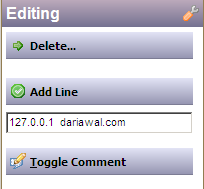
install ee add domain Step by step install Expression Engine with WampServer

Click “Add Line” and you’re done.

Setting VirtualHost

Open file C:\wamp\bin\apache\Apache2.2.11\conf\extra\httpd-vhosts.conf

and add these lines :

<VirtualHost *:80>
ServerAdmin alam@batikweb.com
DocumentRoot “C:/wamp/www/EECore1.6.8″
ServerName dariawal.com

<Directory “C:/wamp/www/EECore1.6.8/”>
Options Indexes FollowSymLinks MultiViews
AllowOverride all
Order Deny,Allow
Deny from all
Allow from 127.0.0.1
</Directory>

</VirtualHost>

Save file.

(EECore1.6.8 is folder name of expression after extracted).

Create new database

To add new database, open phpmyadmin and create new database “ee”.

(Make sure you already start Wampserver.)

install ee create db Step by step install Expression Engine with WampServer

Download Expression Engine

Get latest version of expression engine from here.

At the time of writing this tutorial I get version 1.6.8

Save the file to your preferred folder.
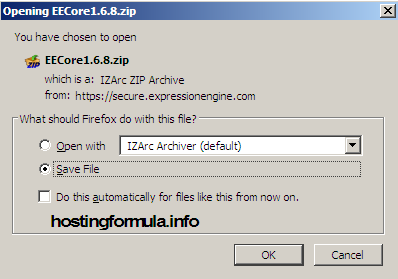
install expression engine 1 Step by step install Expression Engine with WampServer

Extract the file to C:\wamp\www

install expression engine 2 Step by step install Expression Engine with WampServer

Start Install Expression Engine

Open your browser and open address : http://dariawal.com
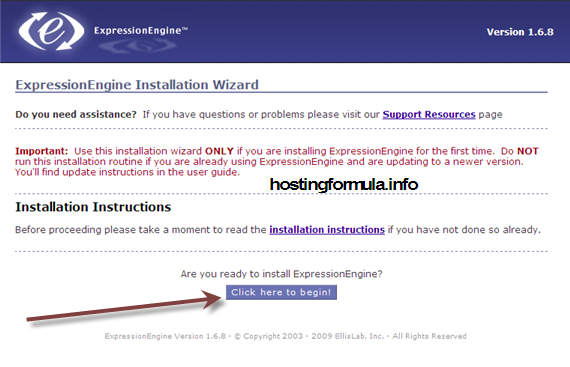
install ee setup 1 Step by step install Expression Engine with WampServer

Click button “click here to begin!

install ee setup 2 Step by step install Expression Engine with WampServer

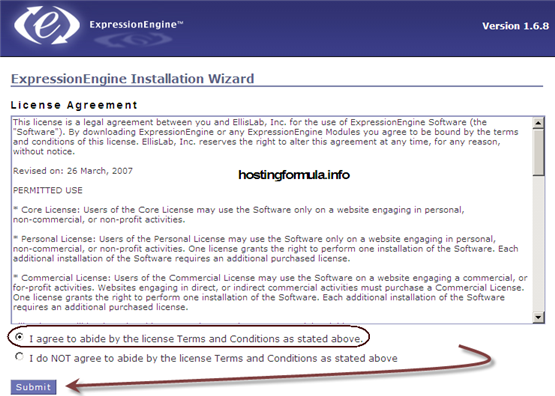
Choose “A agree to abide by the license Terms and Conditions as stated above

Click “Submit” button.

install ee setup 3 Step by step install Expression Engine with WampServer

At this step you have option to change the “system” folder to other name. When you did that make sure to enter that name to input box provided and click Submit.

Setting Wizard

Server Settings
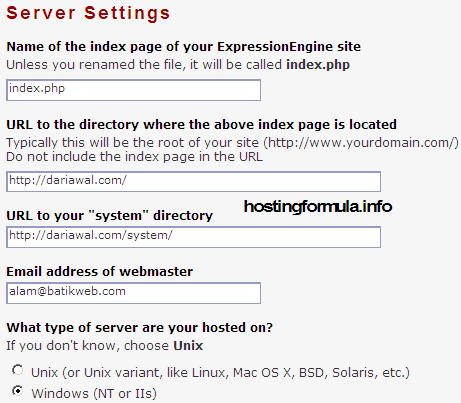
install ee setup 4 Step by step install Expression Engine with WampServer

By default all entry provided by wizard taken from previous step are correct. If you feel it’s not feel free to change.

Database Settings
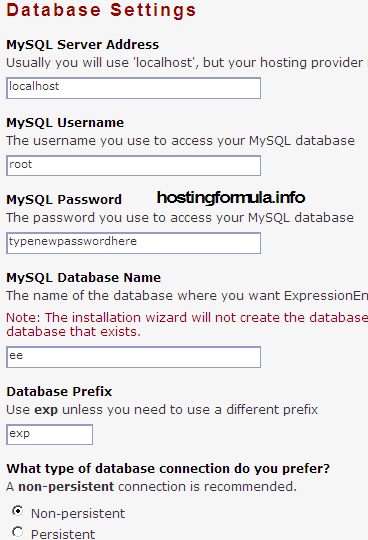
install ee setup 5 Step by step install Expression Engine with WampServer

Enter information related to database, in create new database section I’ve made “ee” database. Let the rest of option to default value.

Encryption Settings

Let default value pointed to SHA1 as suggested by install wizard.

Create your admin account
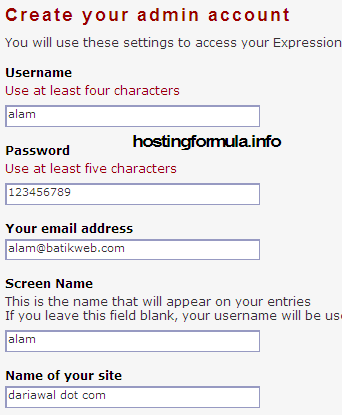
install ee setup 6 Step by step install Expression Engine with WampServer

In this section enter your info, I use alam@batikweb.com (email address I’ve made that work in localhost powered by axigen mail server)

For localizations choose your timezone and let default as theme.

Click button “Click Here to Install ExpressionEngine

as all information entered correctly I get this on my browser.
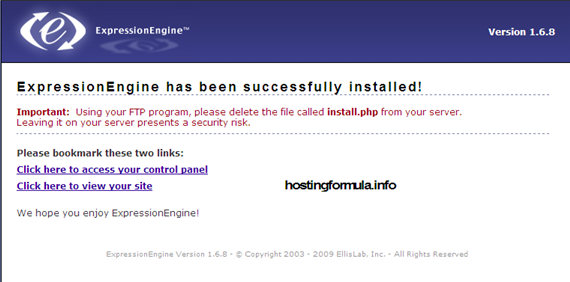
install ee setup 7 Step by step install Expression Engine with WampServer

Great, expressionengine successfully installed.

See you in next post, stay health!

Related Reading:

Using DrupalUsing Drupal

With the recipes in this book, you can take full advantage of the vast collection of community-contributed modules that make the Drupal web framewo... Read More >

Drupal For DummiesDrupal For Dummies

Learn to set up, manage, and administer a Drupal Web site

Drupal offers unparalleled flexibility for content-managed Web sites, but most ... Read More >

Pro Drupal Development, Second EditionPro Drupal Development, Second Edition

Widely praised for its in–depth coverage of Drupal internals, bestselling Pro Drupal Development has been completely updated for Drupal 6 in thi... Read More >

Front End Drupal: Designing, Theming, ScriptingFront End Drupal: Designing, Theming, Scripting

“For Drupal to succeed, we need books like this.”

–Dries Buytaert, Drupal founder and project... Read More >

Cracking Drupal: A Drop in the BucketCracking Drupal: A Drop in the BucketThe first book to reveal the vulnerabilities and security issues that exist in the sites that have been built with Drupal?and how to prevent them from... Read More >

Thanks for reading, if you think this post help you please consider to buy me a beer

Search Terms :

  • expressionengine wamp
  • expression engine wamp
  • wampserver expression engine
  • installing Expression Engine with WAMP
  • installing expressionengine 2
  • EECore1 6 8
  • phpmyadmin create expressionengine
  • expressionengine connect database settings
  • expressionengine Deprecated: Function ereg() is deprecated
  • set domain at wampserver
  • settup expressionengine in wampserver
  • installing expression engine 2
  • where do i find hostexpert in wampserver
  • install express engine cms
  • install expression engine 2
  • expression engine install on wamp
  • installing expressionengine to wordpress
  • install expressionengine 2
  • how to run WAMP server on CD
  • expressionengine phpmyadmin
    • Share/Bookmark
    Step By Step

    If you enjoyed this post, please consider to leave a comment or subscribe to the feed and get future articles delivered to your feed reader.

    Comments

    One Response to “Step by step install Expression Engine with WampServer”